Talks

Talks

Three talks given at a higher-education technology conference in July 2026, designed as a trilogy on the human interface. The first looks back at how interfaces evolved, the second at how organizations change their everyday practice, and the third ahead to content that adapts to each person. Each was a 45-minute session.

Past

The Future Is Accessible: A Brief History of the User Interface

…and its return to text

Thesis. Information naturally moves toward structured text, the form that is cheapest to transform. Accessibility is best understood as that transformability: whether information can become the form a particular person needs.
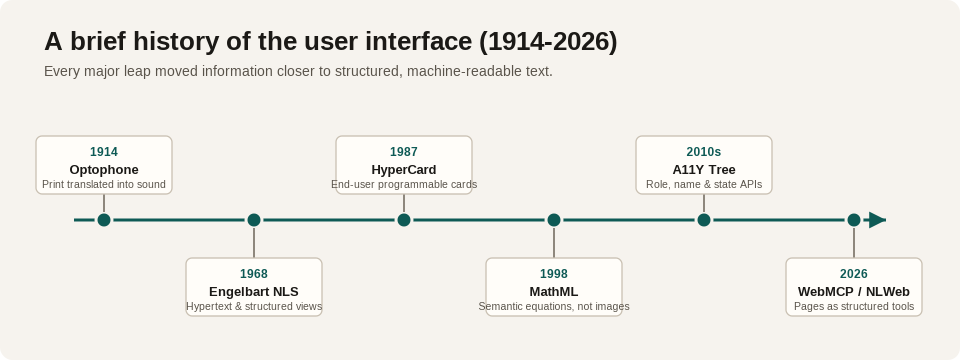
Timeline from 1914 to 2026 tracing user interfaces toward structured text: Optophone (1914), Engelbart NLS (1968), HyperCard (1987), MathML (1998), accessibility trees, and WebMCP/NLWeb (2026).
Every major interface leap has moved information closer to structured, machine-readable text.

Outline

  1. Redefining accessibility.

    Accessibility is framed as the transformation of information, not as compliance paperwork, so one holistic idea replaces memorizing individual criteria. A physics analogy runs through the talk: information "rolls downhill" toward its lowest-energy state, structured text, and every file format is a local minimum where it gets stuck.

  2. Access at the origin.

    Assistive technology came first: the Optophone of 1914 turned printed letters into tones for blind readers, an ancestor of optical character recognition. Douglas Engelbart's 1968 "Mother of All Demos" treated information as structure, with the interface as a thin layer on top.

  3. The text era and the graphical detour.

    Command-line text was compact, searchable, and easy to transform. Graphical interfaces, from Xerox PARC to the Macintosh and Windows, made computing visible to everyone but locked information into visual layouts.

  4. File formats no longer matter.

    A container is a view, not a boundary, and Markdown and HTML are enjoying a renaissance. Curb-cut examples show features built for disability becoming mainstream: captions, word prediction as autocomplete, and text reflow as responsive design.

  5. Circling back to text.

    Bill Atkinson's HyperCard already pointed toward natural language. Today's command palettes, conversational agents, and protocols such as NLWeb and the Model Context Protocol complete the circle. Text with explicit structure, including mathematics expressed as MathML, is transformable by any tool.

  6. Who owns the transformation.

    The old contract asked authors to anticipate every reader. The new one asks authors to supply structure and lets readers transform it. The talk also weighs the counter-arguments: not every interface can be text, and prompting is itself a new literacy barrier.

  7. Closing demonstration.

    A handwritten page containing an equation becomes structured text and MathML that can be navigated and read aloud.

Demonstrations. Archival footage of Engelbart's demonstration and of Atkinson introducing HyperCard; a text interface shown beside a graphical one; and a handwritten-notes-to-accessible-content conversion.

Materials. Slides/recording: ask via @thohne.

Takeaway. The format doesn't matter. The structure does.
Present

Small Shift, Big Change

Leading everyday workflow transformation for accessibility

Thesis. Lasting change comes from everyday workflow, not declarations. Policy creates urgency; workflow creates capability. Automation fixes structure, while people own meaning.

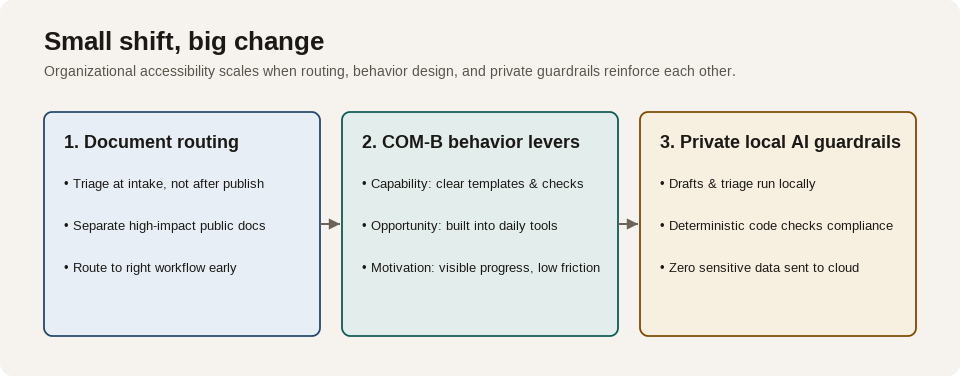
Three-part systems diagram linking document intake routing, COM-B behavior change levers (capability, opportunity, motivation), and private local AI guardrails.
Organizational accessibility scales when intake routing, behavior design, and local guardrails reinforce each other.

Outline

  1. The case for workflow.

    An archive of committee documents spanning many years shows the pattern: problems cluster in older material, and quality improves once better authoring habits take hold. The lesson is that change sticks when it becomes part of how documents are made.

  2. Existing content: route, don't just score.

    The recommended sequence is inventory, classify, verify, and route. An automated bulk pass made safe structural repairs, while a trial of automatic tagging improved many checks but brought almost no documents to full conformance and wrote no usable image descriptions. Along the way, an AI classifier proved confidently wrong and a conversion service failed silently. Each document is therefore routed to one of three paths: repair the PDF, convert it to HTML, or replace it, with a human reviewing meaning on every path.

  3. Make the platform the default.

    A content-management upgrade fixes shared template defects once for every page. It restricts raw HTML and styling, steers forms toward managed tools, and adds "read as text" HTML companions to PDFs. In the learning-management system, an accessibility add-on finds gaps so content owners can close them.

  4. Behavior change.

    The COM-B model (capability, opportunity, motivation) helps diagnose which of the three is missing before choosing an intervention. Reluctant participants are offered a safe, low-stakes first step, together with clear reassurance about privacy.

  5. An engagement model.

    Start with a small, friendly pilot group and short one-on-one observations using each person's real documents. Organize by department or by content type. Offer tools as equals rather than a one-stop shop: an accessibility score, disposition guidance, templates, an AI assistant, and human help.

  6. An AI assistant with guardrails.

    A privately hosted assistant supports four workflows: drafting a syllabus, remediating a PDF, preparing a folder of course files, and converting STEM content to HTML and MathML. It never declares a document "accessible," and student data is a hard stop.

  7. The last mile and the calendar.

    Every workflow ends with automation, then human review of meaning, then validation. The rollout follows the academic calendar in stages, from early notice through firm enforcement, anchored to public federal accessibility requirements.

Demonstrations. A real flyer is walked through an accessibility dashboard: first the automated findings, then the human review that decides what they mean.

Materials. Slides/recording: ask via @thohne.

Takeaway. Before rolling out a product, run one measured pilot. What is the smallest pilot your organization could run? A deadline can start change; everyday practice keeps it going.

Future

The Future of Accessibility Is Personal

One source, a view for every person

Thesis. Content is becoming unique to each person, and what makes that possible is structured, viable data. Creators build the floor; users build the rest. Responsibility is redistributed, not reduced.

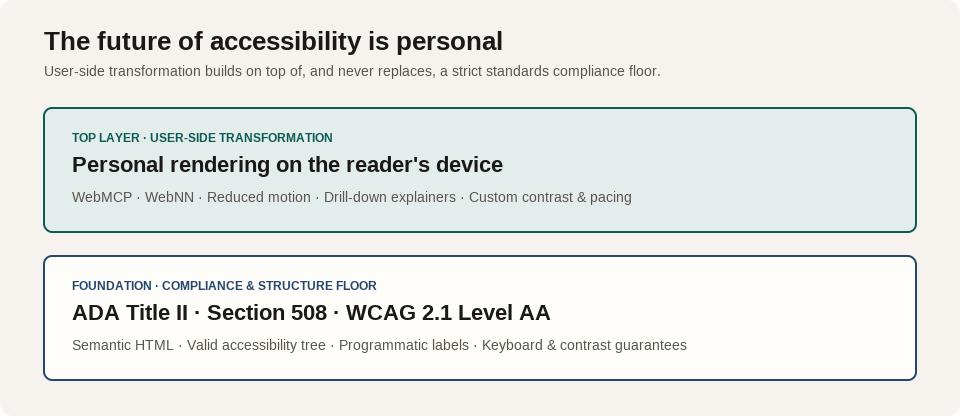
Two-layer stack diagram showing legal and semantic compliance (ADA Title II, Section 508, WCAG) as the foundation supporting user-side transformations via WebMCP, WebNN, reduced motion, and drill-down explainers.
User-side personalization builds on top of, and never replaces, a strict standards compliance floor.

Outline

  1. Your content is already becoming yours.

    Phones now summarize, translate, and read content aloud without any help from the website. The presentation itself respected the audience's reduced-motion settings live, as a small demonstration of the point.

  2. One source, many views.

    The durable asset is structured data, not the artifact built from it. Every person is a context: some needs are permanent, some temporary, and some situational.

  3. The web becomes addressable data.

    With WebMCP, websites can expose their content and actions as permissioned tools, so a person's own agent can reshape them into whatever form that person needs.

  4. The same data in many forms.

    One PDF becomes structured text, an outline, a summary, a table, and audio. An illustrated explainer lets a reader drill into any part of an image to learn more.

  5. Dashboards on demand.

    A single dataset appears as an executive scorecard, a site owner's to-do list, and a trend line, each with accessible charts, alongside an interactive spatial presentation.

  6. Arriving in every pocket.

    On-device features in mobile operating systems, browser-based local AI, WebNN, and NLWeb are bringing this capability to ordinary devices.

  7. The honest floor.

    Available is not the same as adopted, and adopted is not the same as dependable. Access to devices and skills is uneven, and legal requirements such as ADA Title II and Section 508 still set a floor that does not shrink. An extension is not an excuse.

  8. What to do on Monday.

    Make the data viable with a short checklist, and add one procurement question: does this tool preserve the user's ability to transform content?

Demonstrations. A live reduced-motion toggle, extraction of one PDF into many formats, the drill-down illustrated explainer, and a showcase of dashboards and a spatial deck built from the same data.

Materials. Drill-down and canvas demonstrations are on Concepts. Slides/recording: ask via @thohne.

Takeaway. Ship the data, not just the document.